Aiven for Valkey™ clustering Limited availability
Aiven for Valkey™ clustering provides a managed, scalable solution for distributed in-memory data storage with built-in high availability and automatic failover capabilities.
Valkey clustering distributes your data across multiple nodes (shards) to handle larger datasets and higher traffic loads than a single-node deployment can support. Each shard contains a portion of your data, and the cluster automatically routes requests to the appropriate shard.
Key features
High availability
- Automatic failover: If a primary node fails, a replica is automatically promoted to maintain service availability.
- Minimal downtime: Designed to handle both expected maintenance and unexpected failures with minimal service interruption.
- Read replicas: Each shard includes at least one read replica for redundancy and improved read performance.
Scalability
- Flexible sizing: Supports various instance sizes, including smaller 4 GB RAM instances for cost optimization.
Compatibility
- Cluster-enabled mode: Fully compatible with existing Valkey and Redis cluster-aware client libraries.
- Standard protocols: If your application currently uses a client for Valkey standalone mode, switch to a cluster-aware client to enable compatibility with Aiven for Valkey clustering.
Architecture overview
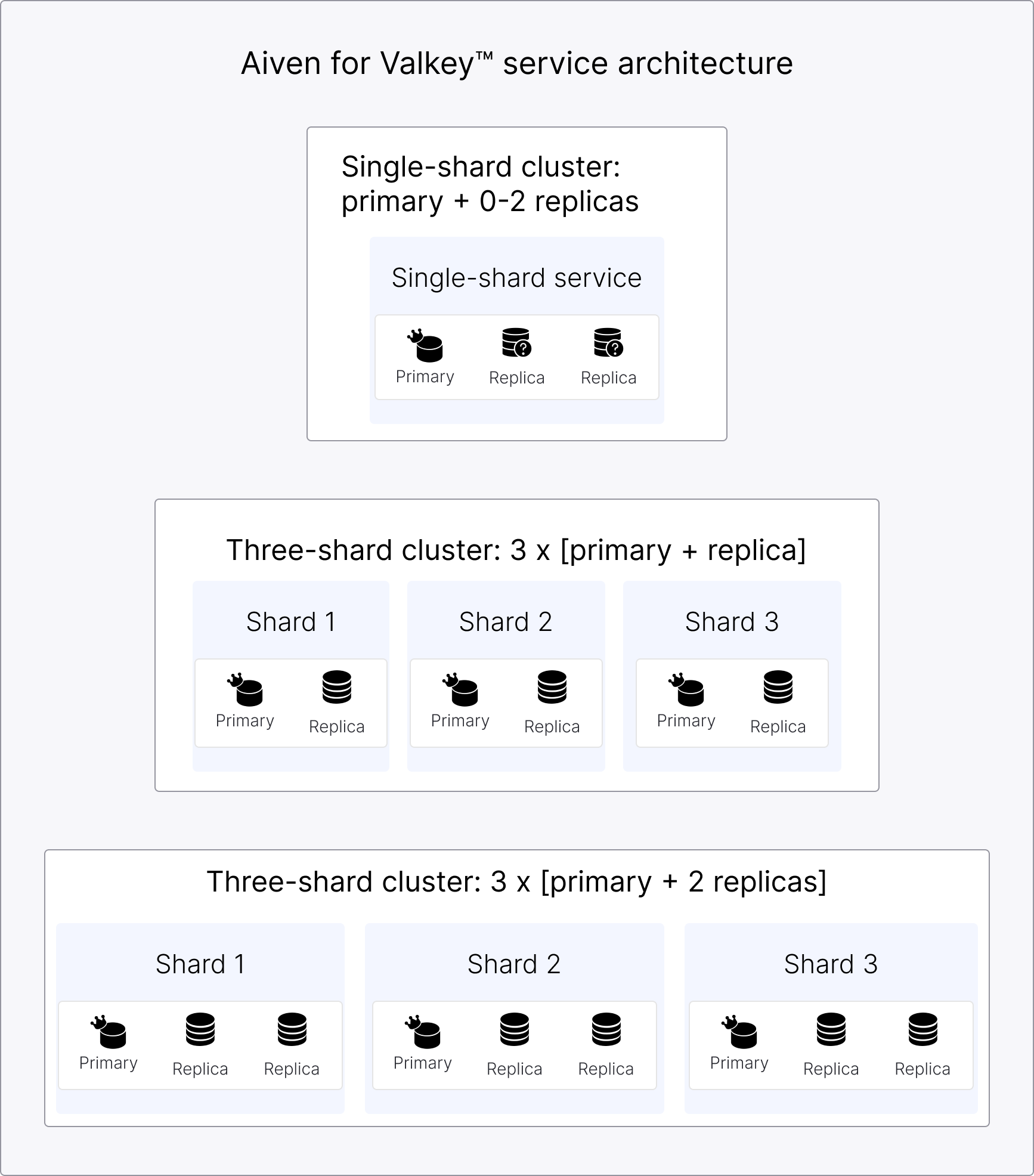
Multi-shard deployment
The typical cluster deployment consists of three primary nodes, each with at least one replica, providing true high availability and scalability.
- Distributed data: Data is automatically partitioned across multiple shards.
- Independent replicas: Each shard has its own set of replicas for redundancy.
- Load distribution: Requests are distributed across shards based on data location.
Single-shard deployment
While Aiven for Valkey supports single-node clusters, this configuration is functionally equivalent to a standalone Valkey instance and is not the primary use case for clustering.
- Initial configuration: Starts with one primary node and 0 - 2 read replicas
- Use case: Ideal for smaller datasets or applications with moderate traffic
- High availability: Automatic failover to replicas if the primary fails
Cluster plans
Cluster-enabled Valkey services use cluster-N plans, where N is the per-node memory
in GiB, for example cluster-4 (4 GiB RAM per node) and cluster-8 (8 GiB RAM per
node). You set the shard count and the replica count independently, using advanced
configuration options. Available on AWS, Azure, and Google Cloud.
Configure a cluster-N plan
When you create or update a service on a cluster-N plan, set the following advanced
configuration options:
shard_count: Number of primary shards in the cluster. Required, from1to5.replicas: Number of replicas per shard. Optional, from0to2. Defaults to0.
The total node count for the cluster is shard_count multiplied by 1 + replicas. For
example, 3 shards with 1 replica each results in 6 nodes. Aiven bills cluster-N plans
per node, so your invoice reflects the total node count at the time of billing.
In the Aiven Console, the service creation and change plan
pages show shard count and replica steppers for cluster-N plans. The estimated
monthly price updates to reflect the total node count as you change either value.
To create a service on a cluster-N plan with the Aiven CLI, set shard_count and
replicas with the -c option:
avn service create demo-valkey \
  --service-type valkey \
  --cloud CLOUD_AND_REGION \
  --plan cluster-4 \
  --project PROJECT_NAME \
  -c shard_count=3 \
  -c replicas=1
You can't change shard_count and replicas in the same update. Change one, wait for
the update to finish, then change the other.
Benefits
Performance
- Higher throughput: Distribute read and write operations across multiple nodes.
- Read scaling: Multiple replicas per shard increase read capacity.
Reliability
- Fault tolerance: Adding replicas for each shard at service creation ensures your service remains available even if individual nodes fail.
- Automatic recovery: Failed nodes are automatically replaced and synchronized.
- Data protection: Multiple copies of your data across different nodes.
Operational simplicity
- Managed service: Aiven handles cluster setup, maintenance, and scaling.
- Automated operations: Node discovery, failover, and resharding happen automatically.
- Monitoring included: Built-in metrics for performance and health monitoring
Use cases
High-traffic applications
- Applications requiring more throughput than a single node can provide
- Systems with high read/write ratios that benefit from multiple replicas
- Services needing guaranteed uptime despite hardware failures
Large datasets
- Data that exceeds the memory capacity of a single node
- Applications requiring data partitioning for performance optimization
- Systems that need to scale storage capacity
Mission-critical systems
- Applications requiring high availability and automatic failover
- Services that cannot tolerate single points of failure
- Systems with strict uptime requirements
How it works
Plan your deployment
- Assess your requirements: Determine your data size, traffic patterns, and availability needs.
- Choose your configuration: Start with a single shard for smaller workloads or multiple shards for larger datasets.
- Select instance sizes: Choose appropriate memory and compute resources for your workload.
Create a clustered service
To enable clustering in Aiven for Valkey, choose a cluster-N plan when creating your
service. See Cluster plans for how to set the shard count and replica
count.
For high availability and improved read scalability, add replicas to each service shard during service creation. This allows you to fully leverage the benefits of clustering from the start.
Configure a client
- Ensure your application uses a cluster-aware Valkey/Redis client library. If your application currently uses a client for Valkey standalone mode, switch to a cluster-aware client to enable compatibility with Aiven for Valkey clustering.
- Configure your client to discover and connect to cluster nodes automatically.
- Test failover behavior to ensure your application handles node changes gracefully.
Resharding
Aiven for Valkey distributes data across primary nodes using hash slots. When the number of primary nodes in your cluster changes, Aiven reshards the cluster automatically. Resharding redistributes the hash slots, and the keys they hold, across the available primary nodes to keep the slots evenly balanced across shards.
The number of primary nodes changes when you update shard_count on a cluster-N
plan. See Configure a cluster-N plan.
Aiven manages the entire process:
- Slot redistribution: Aiven divides the ranges of hash slots owned by each primary node and reassigns them across the updated set of primary nodes.
- Key migration: Keys move together with their slots while the cluster stays available to clients.
- No manual slot management: You cannot move individual slots or assign them to
specific nodes. Aiven controls slot placement to keep the cluster balanced and
consistent. The
MIGRATEcommand that resharding uses to move keys between nodes stays disabled for direct use.
To inspect the slot layout, run CLUSTER NODES on any Valkey node in the cluster. It shows
the current slot distribution across the cluster nodes, so you can also use it to follow
the progress of a resharding operation.
When you scale in a cluster, meaning you reduce the number of primary nodes, the same dataset needs to fit into fewer nodes. If your dataset size exceeds the reduced memory capacity, Valkey starts evicting keys to free up space.
Before you scale in a cluster, set your eviction policy to allkeys-lru, allkeys-lfu, or
allkeys-random. Aiven requires one of these eviction policies for scale-in operations. For
more information, see Memory management.
Backup and restore
Aiven for Valkey automatically backs up your clustered service. Each primary node backs up the data for the hash slots it owns, and Aiven stores these backups in a remote location. Backups run independently for each primary and need no coordination from your application.
To restore a cluster, Aiven combines the stored backups with the recorded hash slot layout, so your data returns to the same slot distribution. The cluster must keep the same number of primary nodes for a restore to succeed.
Cluster backups are not point-in-time recovery (PITR). Because each primary node is backed up independently, backups are not consistent across shards. A restored cluster reflects each primary's data as of its own backup, not a single moment in time across the whole cluster. Design your application to tolerate this if you rely on a restore.
Limitations and considerations
-
Valkey clustering is in limited availability (LA).
-
Valkey clustering is supported for new services only.
-
Performance factors
- Network latency between shards can affect cross-shard operations.
- Resharding operations may temporarily impact performance.
- Client library choice can affect cluster performance and behavior.
Related pages